Blog
How I Back Up 20+ Docker Services to Dropbox Automatically
Table of Contents
I lost everything once.
Not metaphorically. A rm -rf /var/lib/containerd/* during a disk-space cleanup wiped out every Docker volume on my Oracle ARM server. Paperless documents, Joplin notes, Ghostfolio portfolios, Postiz drafts. Gone. I spent a weekend rebuilding the whole stack from memory.
That was the last time I ran a homelab without a real backup strategy.
This post is about what I built after that: a script that dumps all my Postgres databases, copies my Docker configs and .env files, grabs my Paperless documents, and syncs everything to Dropbox every three days. Fully automated, no paid tools, no third-party agents.
If you run a self-hosted homelab on a VPS or home server, this is the setup I wish I had a year ago.
What I’m running
My server is an Oracle Cloud ARM instance (24GB RAM, Ubuntu 24.04) running 20+ Docker services through Cloudflare Tunnel. The stack includes:
- Paperless-ngx for document management
- Linkwarden for bookmarks
- Ghostfolio for portfolio tracking
- Postiz for social scheduling
- Audiobookshelf for audiobooks
- Joplin Server for notes
- Dawarich for location tracking
- Yamtrack for media tracking
- Plus Uptime Kuma, ntfy, Actual Budget, Coolify, and a few others
Each service has its own Postgres container with a different superuser and database name. That’s the part that makes most generic backup guides useless.
Why not just copy Docker volumes?
The short answer: raw volume copies of a live Postgres container are unreliable. If the database is actively writing when you copy the files, your backup may be inconsistent and unrestorable. The official Postgres documentation recommends using pg_dump specifically because it creates a consistent snapshot without needing to stop the database.
For non-database volumes like Paperless media, rsync is fine. For Postgres, pg_dump is the right tool.
The approach
The backup script does four things in order:
- Runs
pg_dumpinside each Postgres container to create a clean SQL dump - Copies all Docker compose files,
.envfiles, and non-database volumes using rsync - Syncs everything to Dropbox via rclone
- Deletes Dropbox backup folders older than 30 days
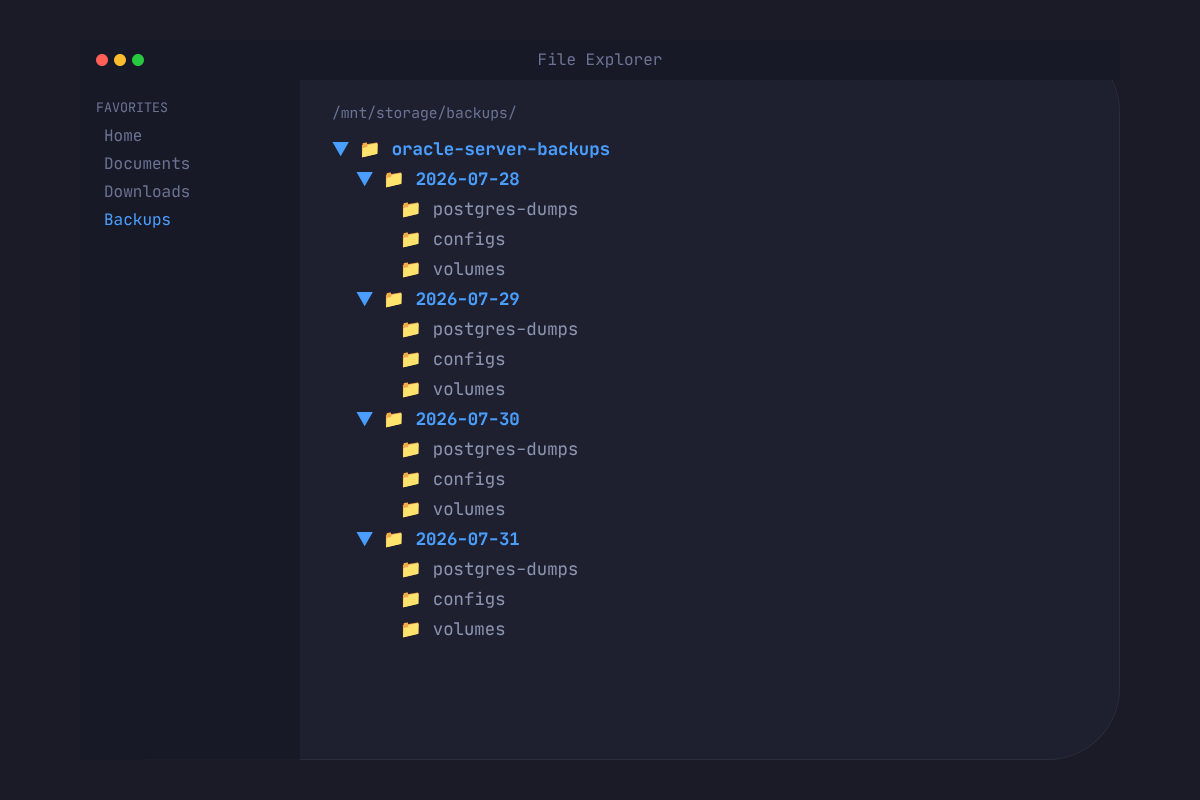
Each backup lands in a dated folder: oracle-server-backups/2026-08-01/. The structure inside looks like this:
oracle-server-backups/
└── 2026-08-01/
    ├── postgres-dumps/
    │   ├── paperless-20260801.sql
    │   ├── ghostfolio-20260801.sql
    │   ├── linkwarden-20260801.sql
    │   └── ... (11 databases total)
    ├── configs/
    │   ├── docker/         ← compose files, .env files, service data
    │   └── rybbit/         ← separate project directory
    └── volumes/
        ├── actual-budget-data/
        ├── paperless-media/
        └── paperless-data/
Setting up rclone with Dropbox on a headless server
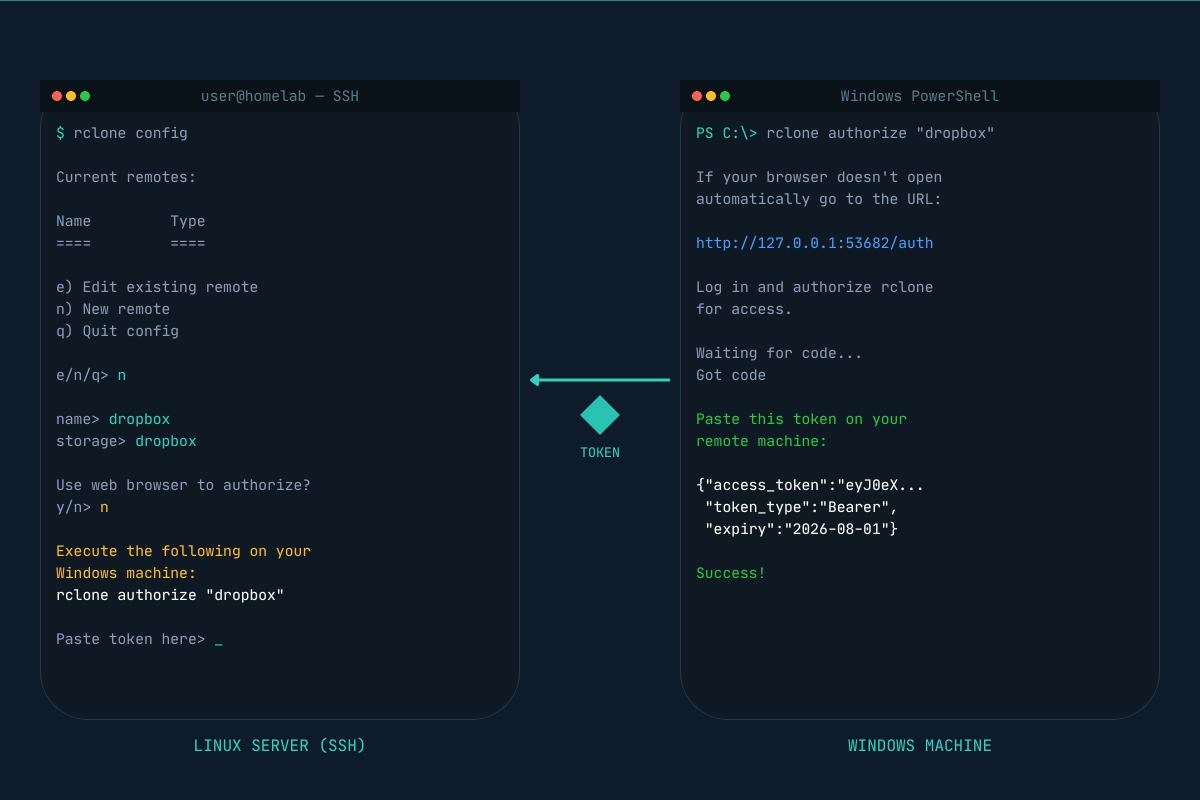
This is the part most guides skip over. Because your server has no browser, you cannot use rclone’s default OAuth flow. You need to run rclone authorize on your local machine instead and paste the token back to the server.
Install rclone on your server first:
curl https://rclone.org/install.sh | sudo bashThen start the config:
rclone configWalk through the prompts: name the remote (I used Dropbox, capital D matters), choose dropbox as the storage type, leave the client ID and secret blank, and when asked about auto config, choose n since you’re on a headless machine.
It will then tell you to run this on your local machine:
rclone authorize "dropbox"On Windows, install rclone from rclone.org/downloads and run:
.\rclone.exe authorize "dropbox"Your browser opens, you log in to Dropbox, and rclone prints a token. Paste that token into the server terminal when prompted. Done.
Verify it works:
rclone ls Dropbox:If you see your Dropbox files, you’re connected.
Finding the right Postgres user for each container
Here’s the problem no generic guide mentions: each Postgres container in a typical homelab uses a different superuser. Some use postgres, some use the app name, some use a custom name set in the compose file.
Running pg_dump -U postgres on a container where the superuser is paperless will fail with a role error. You need to check each container’s environment variables:
for container in your-db-1 your-db-2; do
  echo "=== $container ==="
  docker inspect "$container" --format '{{range .Config.Env}}{{println .}}{{end}}' \
    | grep -E 'POSTGRES_USER|POSTGRES_DB'
done
This gives you the exact username and database name for each container, which is what you need to pass to pg_dump.
The backup script
Create the file:
nano ~/docker/backup-to-dropbox.sh#!/bin/bash
set -euo pipefail
BACKUP_DIR="/tmp/oracle-backup-$(date +%Y%m%d-%H%M%S)"
DROPBOX_DEST="Dropbox:/oracle-server-backups"
LOG="/var/log/dropbox-backup.log"
RETAIN_DAYS=30
echo "" >> "$LOG"
echo "=== Backup started: $(date) ===" >> "$LOG"
mkdir -p "$BACKUP_DIR/postgres-dumps"
mkdir -p "$BACKUP_DIR/configs"
mkdir -p "$BACKUP_DIR/volumes"
# Postgres dumps
# Format: ["container_name"]="db_user:db_name:dump_filename"
declare -A CONTAINERS=(
["paperless-db-1"]="paperless:paperless:paperless"
["ghostfolio-postgres"]="ghostfolio:ghostfolio-db:ghostfolio"
["linkwarden-postgres-1"]="postgres:postgres:linkwarden"
["postiz-postgres"]="postiz-user:postiz-db-local:postiz"
["joplin-postgres"]="joplin:joplin:joplin"
["dawarich_db"]="dawarich:dawarich_production:dawarich"
["yamtrack-db"]="yamtrack:yamtrack:yamtrack"
["sparkyfitness-db"]="sparky:sparkyfitness_db:sparkyfitness"
["coolify-db"]="coolify:coolify:coolify"
["temporal-postgresql"]="temporal:temporal:temporal"
["postgres"]="xahidex:analytics:analytics"
)
for container in "${!CONTAINERS[@]}"; do
IFS=':' read -r db_user db_name dump_name <<< "${CONTAINERS[$container]}"
echo -n "Dumping $dump_name... " >> "$LOG"
if docker exec "$container" pg_dump -U "$db_user" "$db_name" \
> "$BACKUP_DIR/postgres-dumps/${dump_name}-$(date +%Y%m%d).sql" 2>> "$LOG"; then
echo "OK" >> "$LOG"
else
echo "FAILED" >> "$LOG"
fi
done
# Docker configs, compose files, .env files
echo "Copying Docker configs..." >> "$LOG"
sudo rsync -a \
--exclude='audiobookshelf/audiobooks/' \
--exclude='audiobookshelf/podcasts/' \
--exclude='linkwarden/pgdata/' \
--exclude='linkwarden/meili_data/' \
--exclude='onetimesecret/data/redis/' \
~/docker/ "$BACKUP_DIR/configs/docker/" 2>> "$LOG" || true
# Rybbit (lives outside ~/docker)
echo "Copying Rybbit..." >> "$LOG"
cp -r ~/rybbit "$BACKUP_DIR/configs/rybbit/" 2>> "$LOG" || true
# Actual Budget
echo "Copying Actual Budget..." >> "$LOG"
cp -r ~/actual-budget-data "$BACKUP_DIR/volumes/actual-budget-data/" 2>> "$LOG" || true
# Paperless documents and search index
echo "Copying Paperless media..." >> "$LOG"
sudo rsync -a /mnt/media/docker/paperless/media/ \
"$BACKUP_DIR/volumes/paperless-media/" 2>> "$LOG" || true
echo "Copying Paperless data..." >> "$LOG"
sudo rsync -a /mnt/media/docker/paperless/data/ \
"$BACKUP_DIR/volumes/paperless-data/" 2>> "$LOG" || true
# Sync to Dropbox
DATED_DEST="$DROPBOX_DEST/$(date +%Y-%m-%d)"
echo "Syncing to $DATED_DEST..." >> "$LOG"
rclone sync "$BACKUP_DIR" "$DATED_DEST" \
--log-file="$LOG" \
--log-level INFO
# Clean up local temp
rm -rf "$BACKUP_DIR"
echo "Local temp cleaned up." >> "$LOG"
# Delete old Dropbox backups
echo "Pruning backups older than ${RETAIN_DAYS} days..." >> "$LOG"
rclone lsf "$DROPBOX_DEST" --dirs-only | while read -r dir; do
dir_date=$(echo "$dir" | tr -d '/')
dir_epoch=$(date -d "$dir_date" +%s 2>/dev/null || echo 0)
cutoff_epoch=$(date -d "-${RETAIN_DAYS} days" +%s)
if [ "$dir_epoch" -lt "$cutoff_epoch" ] && [ "$dir_epoch" -ne 0 ]; then
echo "Deleting old backup: $dir" >> "$LOG"
rclone purge "$DROPBOX_DEST/$dir" >> "$LOG" 2>&1
fi
done
echo "=== Backup complete: $(date) ===" >> "$LOG"Make it executable and set up the log file:
chmod +x ~/docker/backup-to-dropbox.sh
sudo touch /var/log/dropbox-backup.log
sudo chown ubuntu:ubuntu /var/log/dropbox-backup.log
Run it once manually to verify:
~/docker/backup-to-dropbox.sh && tail -50 /var/log/dropbox-backup.logScheduling with cron
crontab -eAdd this line to run at 3am every three days:
0 3 */3 * * /home/ubuntu/docker/backup-to-dropbox.sh
What I learned the hard way
Each Postgres container uses a different superuser. This tripped me up on almost every container. docker inspect is your best friend here.
Raw volume copies of Postgres are not reliable backups. pg_dump takes longer but the output is portable and consistent. A raw data directory copy of a running database can be corrupted.
Permission denied errors are common. Some service containers write files as root, so their data directories are owned by root even on the host. Adding sudo to the rsync calls fixes this. For containers like Linkwarden’s Meilisearch index, it’s simpler to just exclude those directories since the index can be rebuilt from the database anyway.
The remote name in rclone is case-sensitive. I named mine Dropbox with a capital D during setup, then spent twenty minutes debugging why dropbox:/ returned an error. Check your remote name with rclone listremotes.
Headless OAuth on Windows requires .\rclone.exe, not rclone.exe. PowerShell does not run executables from the current directory without the .\ prefix.
What gets backed up and what doesn’t
After running this setup, here is an honest picture of recoverability:
Fully recoverable:
- All 11 Postgres databases
- All Docker compose files and
.envfiles - Paperless documents (219MB of actual PDFs)
- Actual Budget data
- Audiobookshelf metadata and library structure
- Linkwarden bookmarks and archived pages
- Uptime Kuma monitors and history
- ntfy config, Joplin data, Dawarich location history
Not backed up (intentional):
- 16GB of audiobook files. These are large and can be re-added manually. Backing them up would eat most of a 2TB Dropbox plan on its own.
- Clickhouse analytics data from Rybbit. The compose files are backed up so the service can be reinstalled, but historical analytics would be lost.
- Meilisearch indexes. These are search indexes that get rebuilt automatically from the underlying database data.
The total backup size runs around 950MB per run, well within Dropbox’s limits even keeping 30 days of history.
Monitoring it
Check the last run any time with:
tail -50 /var/log/dropbox-backup.logVerify what is in Dropbox:
rclone ls Dropbox:/oracle-server-backupsThe log will show you exactly which databases dumped successfully, which volumes synced, and the total transfer size. If anything fails, it logs the error message inline so you can see exactly what went wrong.
Resources
- rclone official documentation for the full list of supported cloud storage providers
- rclone remote setup guide for headless and SSH-based OAuth flows
- Postgres pg_dump documentation for dump format options
- Paperless-ngx documentation on their recommended backup approach
The full script is in the post above. Adjust the container names, database users, and paths for your own stack. The pattern is the same regardless of which services you run.
Related reading
You might also enjoy these